Join our Facebook Group
ScriptsTribe • Sngine • Community
Join

Fóruns

The great place to discuss topics with other users

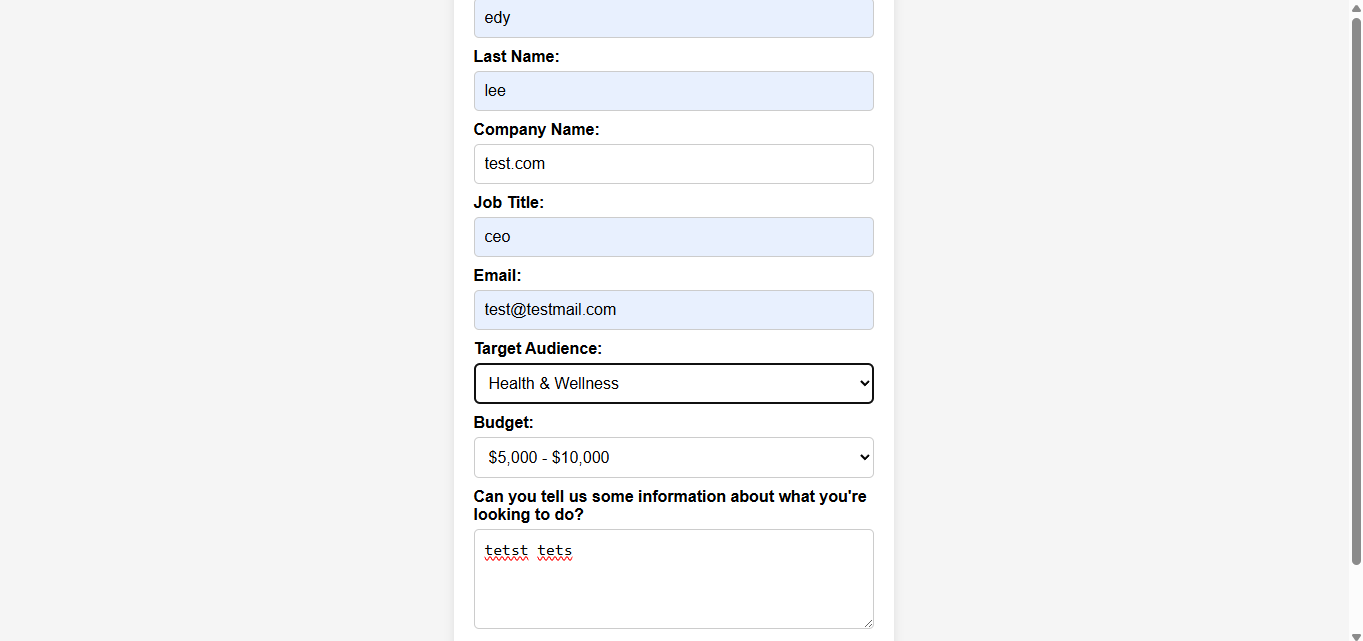
contact form for advertising/partnership

'

Join the Conversation Resposta ao Post
Edy Lee
Admin
Joined: 2024-11-24 00:57:42
2025-06-03 01:08:18

Thanks for the share

Jane Marcia
Admin
Joined: 2025-05-17 02:14:16
2025-06-03 01:45:38


contact.php whatever you wish to name it

 <div class="card mt10">
    <div class="card-header bg-success text-white">
      <i class="fa fa-check-circle mr5"></i> {__("Partnership")}
    </div>
    <div class="card-body">
    
<form action="modules/send_email.php" method="post">
  <label for="first-name">First Name:</label>
  <input type="text" id="first-name" name="first-name" required>

  <label for="last-name">Last Name:</label>
  <input type="text" id="last-name" name="last-name" required>

  <label for="company">Company Name:</label>
  <input type="text" id="company" name="company" required>

  <label for="job-title">Job Title:</label>
  <input type="text" id="job-title" name="job-title" required>

  <label for="email">Email:</label>
  <input type="email" id="email" name="email" required>

  <label for="audience">Target Audience:</label>
  <select id="audience" name="audience">
    <option value="general">General Consumers</option>
    <option value="tech">Tech Enthusiasts</option>
    <option value="business">Business Professionals</option>
    <option value="finance">Finance & Investors</option>
    <option value="gaming">Gamers</option>
    <option value="health">Health & Wellness</option>
    <option value="education">Students & Educators</option>
    <option value="entertainment">Entertainment & Media</option>
  </select>

  <label for="budget">Budget:</label>
  <select id="budget" name="budget">
    <option value="5000-10000">$5,000 - $10,000</option>
    <option value="10000-20000">$10,000 - $20,000</option>
    <option value="20000+">$20,000+</option>
  </select>

  <label for="details">Can you tell us some information about what you're looking to do?</label>
  <textarea id="details" name="details" maxlength="500" required></textarea>

  <button type="submit">Submit</button>
</form>
    </div>
  </div>


Php modules>

<?php
if ($_SERVER["REQUEST_METHOD"] == "POST") {
    $to = "youremail@yourwebsite.com";
    $subject = "Advertising Inquiry";

    $firstName = htmlspecialchars($_POST["first-name"]);
    $lastName = htmlspecialchars($_POST["last-name"]);
    $company = htmlspecialchars($_POST["company"]);
    $jobTitle = htmlspecialchars($_POST["job-title"]);
    $email = htmlspecialchars($_POST["email"]);
    $audience = htmlspecialchars($_POST["audience"]);
    $budget = htmlspecialchars($_POST["budget"]);
    $details = htmlspecialchars($_POST["details"]); // New field

    $headers = "From: $email\r\n";
    $headers .= "Reply-To: $email\r\n";

    $body = "Name: $firstName $lastName\nCompany: $company\nJob Title: $jobTitle\nEmail: $email\n\nTarget Audience:\n$audience\n\nBudget: $budget\n\nDetails:\n$details";

    if (mail($to, $subject, $body, $headers)) {
        echo "Your email has been sent successfully.";
    } else {
        echo "There was an error sending your email.";
    }
}
?>


Css

<style>
body {
    font-family: Arial, sans-serif;
    background-color: #f5f5f5;
    display: flex;
    justify-content: center;
    align-items: center;
    height: 100vh;
    margin: 0;
}

form {
    background: white;
    padding: 20px;
    border-radius: 8px;
    box-shadow: 0 0 10px rgba(0, 0, 0, 0.1);
    width: 400px;
}

label {
    display: block;
    margin-top: 10px;
    font-weight: bold;
}

input, textarea, select {
    width: 100%;
    padding: 10px;
    margin-top: 5px;
    border: 1px solid #ccc;
    border-radius: 5px;
    font-size: 16px;
}

textarea {
    height: 100px;
}

button {
    margin-top: 15px;
    padding: 10px 15px;
    background-color: #007BFF;
    border: none;
    color: white;
    font-size: 16px;
    cursor: pointer;
    border-radius: 5px;
    transition: background 0.3s ease;
}

button:hover {
    background-color: #0056b3;
}
</style>

Follow @jane's tutorial to get it to work with your sngine How to create a Dynamic Page instead of Static page

Edy Lee
Admin
Joined: 2024-11-24 00:57:42
2025-06-03 02:03:41


contact.php whatever you wish to name it

 <div class="card mt10">
    <div class="card-header bg-success text-white">
      <i class="fa fa-check-circle mr5"></i> {__("Partnership")}
    </div>
    <div class="card-body">
    
<form action="modules/send_email.php" method="post">
  <label for="first-name">First Name:</label>
  <input type="text" id="first-name" name="first-name" required>

  <label for="last-name">Last Name:</label>
  <input type="text" id="last-name" name="last-name" required>

  <label for="company">Company Name:</label>
  <input type="text" id="company" name="company" required>

  <label for="job-title">Job Title:</label>
  <input type="text" id="job-title" name="job-title" required>

  <label for="email">Email:</label>
  <input type="email" id="email" name="email" required>

  <label for="audience">Target Audience:</label>
  <select id="audience" name="audience">
    <option value="general">General Consumers</option>
    <option value="tech">Tech Enthusiasts</option>
    <option value="business">Business Professionals</option>
    <option value="finance">Finance & Investors</option>
    <option value="gaming">Gamers</option>
    <option value="health">Health & Wellness</option>
    <option value="education">Students & Educators</option>
    <option value="entertainment">Entertainment & Media</option>
  </select>

  <label for="budget">Budget:</label>
  <select id="budget" name="budget">
    <option value="5000-10000">$5,000 - $10,000</option>
    <option value="10000-20000">$10,000 - $20,000</option>
    <option value="20000+">$20,000+</option>
  </select>

  <label for="details">Can you tell us some information about what you're looking to do?</label>
  <textarea id="details" name="details" maxlength="500" required></textarea>

  <button type="submit">Submit</button>
</form>
    </div>
  </div>


Php modules>

<?php
if ($_SERVER["REQUEST_METHOD"] == "POST") {
    $to = "youremail@yourwebsite.com";
    $subject = "Advertising Inquiry";

    $firstName = htmlspecialchars($_POST["first-name"]);
    $lastName = htmlspecialchars($_POST["last-name"]);
    $company = htmlspecialchars($_POST["company"]);
    $jobTitle = htmlspecialchars($_POST["job-title"]);
    $email = htmlspecialchars($_POST["email"]);
    $audience = htmlspecialchars($_POST["audience"]);
    $budget = htmlspecialchars($_POST["budget"]);
    $details = htmlspecialchars($_POST["details"]); // New field

    $headers = "From: $email\r\n";
    $headers .= "Reply-To: $email\r\n";

    $body = "Name: $firstName $lastName\nCompany: $company\nJob Title: $jobTitle\nEmail: $email\n\nTarget Audience:\n$audience\n\nBudget: $budget\n\nDetails:\n$details";

    if (mail($to, $subject, $body, $headers)) {
        echo "Your email has been sent successfully.";
    } else {
        echo "There was an error sending your email.";
    }
}
?>


Css

<style>
body {
    font-family: Arial, sans-serif;
    background-color: #f5f5f5;
    display: flex;
    justify-content: center;
    align-items: center;
    height: 100vh;
    margin: 0;
}

form {
    background: white;
    padding: 20px;
    border-radius: 8px;
    box-shadow: 0 0 10px rgba(0, 0, 0, 0.1);
    width: 400px;
}

label {
    display: block;
    margin-top: 10px;
    font-weight: bold;
}

input, textarea, select {
    width: 100%;
    padding: 10px;
    margin-top: 5px;
    border: 1px solid #ccc;
    border-radius: 5px;
    font-size: 16px;
}

textarea {
    height: 100px;
}

button {
    margin-top: 15px;
    padding: 10px 15px;
    background-color: #007BFF;
    border: none;
    color: white;
    font-size: 16px;
    cursor: pointer;
    border-radius: 5px;
    transition: background 0.3s ease;
}

button:hover {
    background-color: #0056b3;
}
</style>

Follow @jane's tutorial to get it to work with your sngine How to create a Dynamic Page instead of Static page

Richard  Wing
Admin
Joined: 2025-01-18 19:22:40
2025-06-04 06:10:58


contact.php whatever you wish to name it

 <div class="card mt10">
    <div class="card-header bg-success text-white">
      <i class="fa fa-check-circle mr5"></i> {__("Partnership")}
    </div>
    <div class="card-body">
    
<form action="modules/send_email.php" method="post">
  <label for="first-name">First Name:</label>
  <input type="text" id="first-name" name="first-name" required>

  <label for="last-name">Last Name:</label>
  <input type="text" id="last-name" name="last-name" required>

  <label for="company">Company Name:</label>
  <input type="text" id="company" name="company" required>

  <label for="job-title">Job Title:</label>
  <input type="text" id="job-title" name="job-title" required>

  <label for="email">Email:</label>
  <input type="email" id="email" name="email" required>

  <label for="audience">Target Audience:</label>
  <select id="audience" name="audience">
    <option value="general">General Consumers</option>
    <option value="tech">Tech Enthusiasts</option>
    <option value="business">Business Professionals</option>
    <option value="finance">Finance & Investors</option>
    <option value="gaming">Gamers</option>
    <option value="health">Health & Wellness</option>
    <option value="education">Students & Educators</option>
    <option value="entertainment">Entertainment & Media</option>
  </select>

  <label for="budget">Budget:</label>
  <select id="budget" name="budget">
    <option value="5000-10000">$5,000 - $10,000</option>
    <option value="10000-20000">$10,000 - $20,000</option>
    <option value="20000+">$20,000+</option>
  </select>

  <label for="details">Can you tell us some information about what you're looking to do?</label>
  <textarea id="details" name="details" maxlength="500" required></textarea>

  <button type="submit">Submit</button>
</form>
    </div>
  </div>


Php modules>

<?php
if ($_SERVER["REQUEST_METHOD"] == "POST") {
    $to = "youremail@yourwebsite.com";
    $subject = "Advertising Inquiry";

    $firstName = htmlspecialchars($_POST["first-name"]);
    $lastName = htmlspecialchars($_POST["last-name"]);
    $company = htmlspecialchars($_POST["company"]);
    $jobTitle = htmlspecialchars($_POST["job-title"]);
    $email = htmlspecialchars($_POST["email"]);
    $audience = htmlspecialchars($_POST["audience"]);
    $budget = htmlspecialchars($_POST["budget"]);
    $details = htmlspecialchars($_POST["details"]); // New field

    $headers = "From: $email\r\n";
    $headers .= "Reply-To: $email\r\n";

    $body = "Name: $firstName $lastName\nCompany: $company\nJob Title: $jobTitle\nEmail: $email\n\nTarget Audience:\n$audience\n\nBudget: $budget\n\nDetails:\n$details";

    if (mail($to, $subject, $body, $headers)) {
        echo "Your email has been sent successfully.";
    } else {
        echo "There was an error sending your email.";
    }
}
?>


Css

<style>
body {
    font-family: Arial, sans-serif;
    background-color: #f5f5f5;
    display: flex;
    justify-content: center;
    align-items: center;
    height: 100vh;
    margin: 0;
}

form {
    background: white;
    padding: 20px;
    border-radius: 8px;
    box-shadow: 0 0 10px rgba(0, 0, 0, 0.1);
    width: 400px;
}

label {
    display: block;
    margin-top: 10px;
    font-weight: bold;
}

input, textarea, select {
    width: 100%;
    padding: 10px;
    margin-top: 5px;
    border: 1px solid #ccc;
    border-radius: 5px;
    font-size: 16px;
}

textarea {
    height: 100px;
}

button {
    margin-top: 15px;
    padding: 10px 15px;
    background-color: #007BFF;
    border: none;
    color: white;
    font-size: 16px;
    cursor: pointer;
    border-radius: 5px;
    transition: background 0.3s ease;
}

button:hover {
    background-color: #0056b3;
}
</style>

Follow @jane's tutorial to get it to work with your sngine How to create a Dynamic Page instead of Static page

ScriptsTribe https://scriptstribe.com