


Help Center
Find answers or browse our knowledge base.
Latest Questions
🎵 MediaMix for Sngine Installation Guide
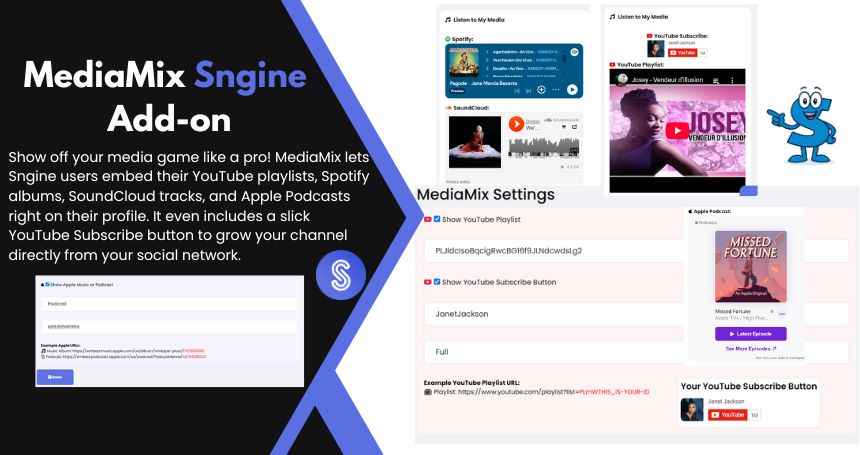
Welcome to the MediaMix Add-on for Sngine! This add-on allows users to showcase their media playlists from platforms like YouTube, Spotify, SoundCloud, and Apple Podcasts directly on their profile.
If you yet don't have, you can purchase this addon here
📁 Step 1: Upload the Files
Unzip the SngineMediaMixV1 file and upload following the file instructure:
🧩 Step 2: install the Database Table
- Open your browser and visit:
>https://yourdomain.com/mediamix_installer.php
🔧 Step 3: Update root/profile.php
In your main profile.php file, add the following after the line that assigns $profile to the template:
// ScriptsTribe MediaMix Start
require_once __DIR__ . '/modules/mediamix/mediamix_helper.php';
$profile['mediamix'] = get_user_mediamix($profile['user_id']);
$smarty->assign('profile', $profile);
// ScriptsTribe MediaMix end
🎨 Step 4: Display It on Profile
In your profile.tpl, include the MediaMix block where you want it to appear: I added mine under the search box
{include file='mediamix/profileblock.tpl'}⚙️ Step 5: User Settings menu
Now you need to edit _user_menu.tpl
Look for
    {include file='__svg_icons.tpl' icon="settings" class="main-icon mr10" width="20px" height="20px"}
    {__("Settings")}
and after that add
    {include file='__svg_icons.tpl' icon="media-player" class="main-icon mr10" width="20px" height="20px"}
    {__("Media Players Settings")}
Step 5: Edit htaccess file
add this code
# BEGIN MediaMix Module
RewriteRule ^mediamix/?$ modules/mediamix/index.php [QSA,L]
# END MediaMix Module
Now visit yousite.com/mediamix this is the settings page
- Each media block will only show if enabled and filled out.
- You can customize icon styles, order, and player dimensions from the
mediamix/index.tpl.
That’s it! MediaMix is now integrated 🎉
Was this answer helpful?
How could it be better?
What went wrong?

 Arabic
 Czech
Czech
 French
 Spanish
 Portuguese
 Deutsch
 Turkish
 Dutch
Dutch
 Italiano
 Russian
 Romaian
 Portuguese (Brazil)
 Greek
Greek
