


Help Center
Find answers or browse our knowledge base.
Latest Questions
How to Install the Plugin System
If you have the old Addo-on Manager/Plugins System install, please remove all files and code related to it first...
All Plugins Must be deactivated before you upload and run the installaller
Please restore the admin.tpl to default if you installed this before....
Installation is very simple, upload all the plugin system files following the folder instruction. Visit the plugin installer at
YOURDOMAIN.com/PluginSystem/install/index.phpPs: you must go to YOURDOMAIN.com/PluginSystem/install/index.php
Not: YOURDOMAIN.com/PluginSystem/install/index.html
Copy the link from the code box and replace with your domain just to be sure
Upload the Plugin System following the zip structure to you Sngine Site Root.
Click the buttons on Steps1-3 and follow the guide
If you with to install in all theme. Switch to the theme you want to install and run the installer of step 2 again and repeat to as many themes you wish to install the Plugin System too.
You are done
Please clear you browser cache and delete compile template files via admin.
The work in this add-on is still in progress, please wait for future fixes, I just wanted you to have this already... or you would wait a year :D
Look for the tutorial on How to install and addon...
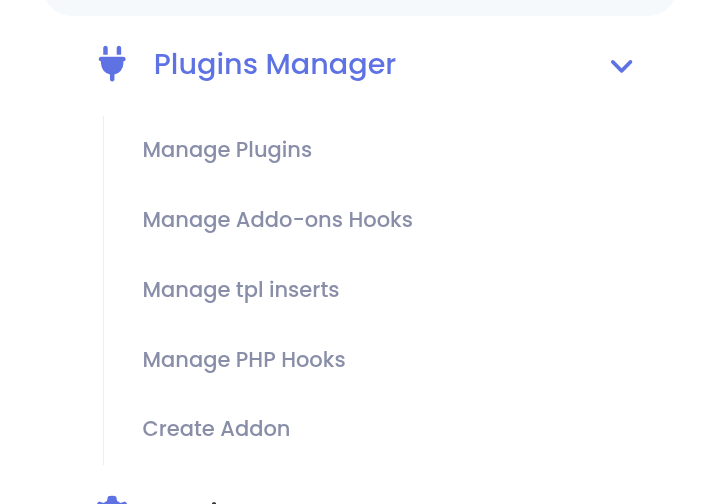
When visiting admincp you should see this menu
Troubleshoot:
If you face any issue and need help, please post questions under Plugin System forums so your questions and answers may benefit others Plugin System Forums
If you need me to install if for you, please purchase the Add-on Installation service in the market and after that text me via chat. Please notice, this plugin is already free, I cannot install for free fo everybody.
Was this answer helpful?
How could it be better?
What went wrong?

 English
 Arabic
 Czech
Czech
 French
 Spanish
 Deutsch
 Turkish
 Dutch
Dutch
 Italiano
 Russian
 Romaian
 Portuguese (Brazil)
 Greek
Greek
