




إصدار API 1.1
توضح هذه الوثائق كيفية تسجيل وتهيئة وتطوير تطبيقك حتى تتمكن من استخدام واجهات برمجة التطبيقات الخاصة بنا بنجاح
أنشئ تطبيقًا
لكي يتمكن تطبيقك من الوصول إلى واجهات برمجة التطبيقات الخاصة بنا ، يجب عليك تسجيل التطبيق الخاص بك باستخدام لوحة معلومات التطبيق. ينشئ التسجيل معرف التطبيق الذي يتيح لنا معرفة من أنت ، ويساعدنا على تمييز تطبيقك عن التطبيقات الأخرى.
- سوف تحتاج إلى إنشاء تطبيق جديد إضافة تطبيق جديد
- بمجرد إنشاء التطبيق الخاص بك سوف تحصل على الخاص بك app_id و app_secret
تسجيل الدخول مع
يعد تسجيل الدخول باستخدام النظام طريقة سريعة وملائمة للأشخاص لإنشاء حسابات وتسجيل الدخول إلى تطبيقك. يتيح نظام تسجيل الدخول باستخدام لدينا سيناريوهين ، المصادقة وطلب الأذونات للوصول إلى بيانات الأشخاص. يمكنك استخدام نظام تسجيل الدخول ببساطة للمصادقة أو للمصادقة والوصول إلى البيانات.
-
لبدء عملية تسجيل الدخول إلى OAuth ، تحتاج إلى إستخدام رابط لتطبيقك مثل هذا:
<a href="https://scriptstribe.com/api/oauth?app_id=YOUR_APP_ID">Log in With ScriptsTribe</a>
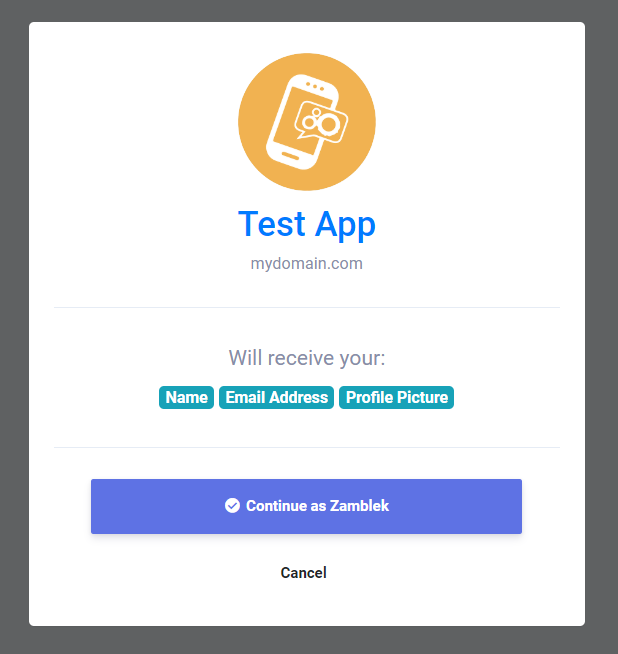
ستتم إعادة توجيه المستخدم إلى صفحة تسجيل الدخول باستخدام مثل هذه
-
بمجرد قبول المستخدم لتطبيقك ، ستتم إعادة توجيه المستخدم إلى عنوان URL لإعادة توجيه التطبيق باستخدام auth_key مثل هذا:
https://mydomain.com/my_redirect_url.php?auth_key=AUTH_KEY
هذا auth_key صالح للاستخدام مرة واحدة فقط ، لذلك بمجرد استخدامه لن تتمكن من استخدامه مرة أخرى وإنشاء رمز جديد ، ستحتاج إلى إعادة توجيه المستخدم إلى تسجيل الدخول باستخدام الرابط مرة أخرى.
Access Token
بمجرد حصولك على موافقة المستخدم لتطبيقك ، قم بتسجيل الدخول باستخدام نافذة وإرجاعها بامتداد auth_key مما يعني أنك الآن جاهز لاسترداد البيانات من واجهات برمجة التطبيقات الخاصة بنا ولبدء هذه العملية ، ستحتاج إلى ترخيص تطبيقك والحصول على access_token ويمكنك اتباع خطواتنا لمعرفة كيفية الحصول عليها.
-
للحصول على رمز وصول ، قم بإجراء طلب HTTP GET لنقطة النهاية التالية مثل هذا:
        <?php

        $app_id = "YOUR_APP_ID"; // your app id
        $app_secret = "YOUR_APP_SECRET"; // your app secret
        $auth_key = $_GET['auth_key']; // the returned auth key from previous step

        // Prepare the POST data
        $postData = [
          'app_id' => $app_id,
          'app_secret' => $app_secret,
          'auth_key' => $auth_key
        ];

        // Initialize cURL
        $ch = curl_init('https://scriptstribe.com/api/authorize');

        // Set cURL options for POST
        curl_setopt($ch, CURLOPT_RETURNTRANSFER, true);
        curl_setopt($ch, CURLOPT_POST, true);
        curl_setopt($ch, CURLOPT_POSTFIELDS, http_build_query($postData));

        // Execute request
        $response = curl_exec($ch);

        // Check for cURL errors
        if (curl_errno($ch)) {
          die('cURL error: ' . curl_error($ch));
        }

        curl_close($ch);

        // Decode the JSON response
        $json = json_decode($response, true);

        // Use the access token if available
        if (!empty($json['access_token'])) {
          $access_token = $json['access_token']; // your access token
        }
        ?>
هذا access_token صالحة لمدة ساعة واحدة فقط ، لذلك بمجرد أن تصبح غير صالحة ، ستحتاج إلى إنشاء واحدة جديدة عن طريق إعادة توجيه المستخدم إلى تسجيل الدخول باستخدام الرابط مرة أخرى.
واجهات برمجة التطبيقات APIs
بمجرد حصولك على access_token يمكنك الآن استرداد المعلومات من نظامك عبر طلبات HTTP GET التي تدعم المعلمات التالية
| نقطة النهاية | التفاصيل |
|---|---|
| api/get_user_info |
الحصول على معلومات المستخدم |
يمكنك استرداد معلومات المستخدم مثل هذا
        if(!empty($json['access_token'])) {
            $access_token = $json['access_token']; // your access token
            $get = file_get_contents("https://scriptstribe.com/api/get_user_info?access_token=$access_token");
        }
النتيجة ستكون:
        {
          "user_info": {
          "user_id": "",
          "user_name": "",
          "user_email": "",
          "user_firstname": "",
          "user_lastname": "",
          "user_gender": "",
          "user_birthdate": "",
          "user_picture": "",
          "user_cover": "",
          "user_registered": "",
          "user_verified": "",
          "user_relationship": "",
          "user_biography": "",
          "user_website": ""
          }
        }

 English
 Czech
Czech
 French
 Spanish
 Portuguese
 Deutsch
 Turkish
 Dutch
Dutch
 Italiano
 Russian
 Romaian
 Portuguese (Brazil)
 Greek
Greek
