




API Version 1.1
This documentation explain how to register, configure, and develop your app so you can successfully use our APIs
Create App
In order for your app to access our APIs, you must register your app using the App Dashboard. Registration creates an App ID that lets us know who you are, helps us distinguish your app from other apps.
- You will need to create a new App Create New App
- Once you created your App you will get your app_id and app_secret
Log in With
Log in With system is a fast and convenient way for people to create accounts and log into your app. Our Log in With system enables two scenarios, authentication and asking for permissions to access people's data. You can use Login With system simply for authentication or for both authentication and data access.
-
Starting the OAuth login process, You need to use a link for your app like this:
<a href="https://scriptstribe.com/api/oauth?app_id=YOUR_APP_ID">Log in With ScriptsTribe</a>
The user will be redirect to Log in With page like this
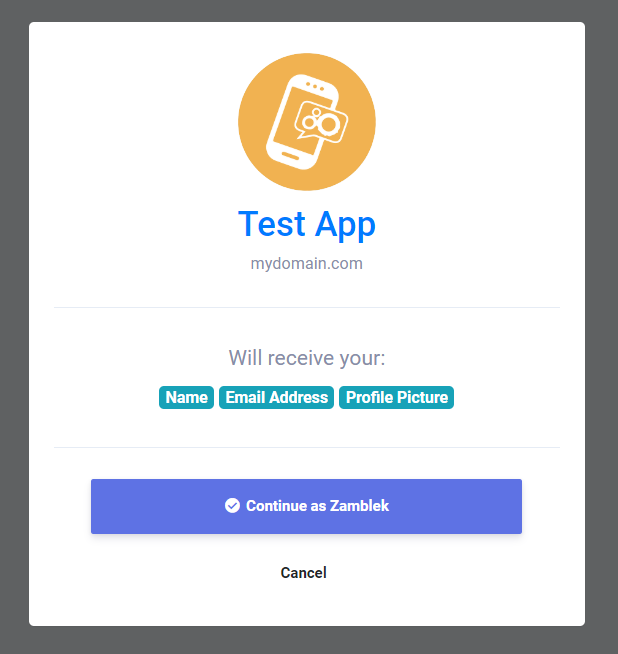
-
Once the user accpeted your app, the user will be redirected to your App Redirect URL with auth_key like this:
https://mydomain.com/my_redirect_url.php?auth_key=AUTH_KEY
This auth_key valid only for one time usage, so once you used it you will not be able to use it again and generate new code you will need to redirect the user to the log in with link again.
Access Token
Once you get the user approval of your app Log in With window and returned with the auth_key which means that now you are ready to retrive data from our APIs and to start this process you will need to authorize your app and get the access_token and you can follow our steps to learn how to get it.
-
To get an access token, make an HTTP GET request to the following endpoint like this:
        <?php

        $app_id = "YOUR_APP_ID"; // your app id
        $app_secret = "YOUR_APP_SECRET"; // your app secret
        $auth_key = $_GET['auth_key']; // the returned auth key from previous step

        // Prepare the POST data
        $postData = [
          'app_id' => $app_id,
          'app_secret' => $app_secret,
          'auth_key' => $auth_key
        ];

        // Initialize cURL
        $ch = curl_init('https://scriptstribe.com/api/authorize');

        // Set cURL options for POST
        curl_setopt($ch, CURLOPT_RETURNTRANSFER, true);
        curl_setopt($ch, CURLOPT_POST, true);
        curl_setopt($ch, CURLOPT_POSTFIELDS, http_build_query($postData));

        // Execute request
        $response = curl_exec($ch);

        // Check for cURL errors
        if (curl_errno($ch)) {
          die('cURL error: ' . curl_error($ch));
        }

        curl_close($ch);

        // Decode the JSON response
        $json = json_decode($response, true);

        // Use the access token if available
        if (!empty($json['access_token'])) {
          $access_token = $json['access_token']; // your access token
        }
        ?>
This access_token valid only for only one 1 hour, so once it got invalid you will need to genarte new one by redirect the user to the log in with link again.
APIs
Once you get your access_token Now you can retrieve informations from our system via HTTP GET requests which supports the following parameters
| Endpoint | Περιγραφή |
|---|---|
| api/get_user_info |
get user info |
You can retrive user info like this
        if(!empty($json['access_token'])) {
            $access_token = $json['access_token']; // your access token
            $get = file_get_contents("https://scriptstribe.com/api/get_user_info?access_token=$access_token");
        }
The result will be:
        {
          "user_info": {
          "user_id": "",
          "user_name": "",
          "user_email": "",
          "user_firstname": "",
          "user_lastname": "",
          "user_gender": "",
          "user_birthdate": "",
          "user_picture": "",
          "user_cover": "",
          "user_registered": "",
          "user_verified": "",
          "user_relationship": "",
          "user_biography": "",
          "user_website": ""
          }
        }

 English
 Arabic
 Czech
Czech
 French
 Spanish
 Portuguese
 Deutsch
 Turkish
 Dutch
Dutch
 Italiano
 Russian
 Romaian
 Portuguese (Brazil)
