




Version de l’API 1.1
Cette documentation explique comment enregistrer, configurer et développer votre application afin que vous puissiez utiliser nos API avec succès.
Créer une application
Pour que votre application puisse accéder à nos API, vous devez enregistrer votre application à l’aide du bouton Tableau de bord de l’application. L’inscription crée un ID d’application qui nous permet de savoir qui vous êtes, nous aide à distinguer votre application des autres applications.
- Vous devrez créer une nouvelle application Créer une nouvelle application
- Une fois que vous avez créé votre application, vous obtiendrez votre app_id et app_secret
Connectez-vous avec
Se connecter avec le système est un moyen rapide et pratique pour les gens de créer des comptes et de se connecter à votre application. Notre système Log in With permet deux scénarios, l’authentification et la demande d’autorisations pour accéder aux données des personnes. Vous pouvez utiliser Connexion avec le système simplement pour l’authentification ou pour l’authentification et l’accès aux données.
-
Démarrage du processus de connexion OAuth, vous devez utiliser un lien pour votre application comme celui-ci:
<a href="https://scriptstribe.com/api/oauth?app_id=YOUR_APP_ID">Log in With ScriptsTribe</a>
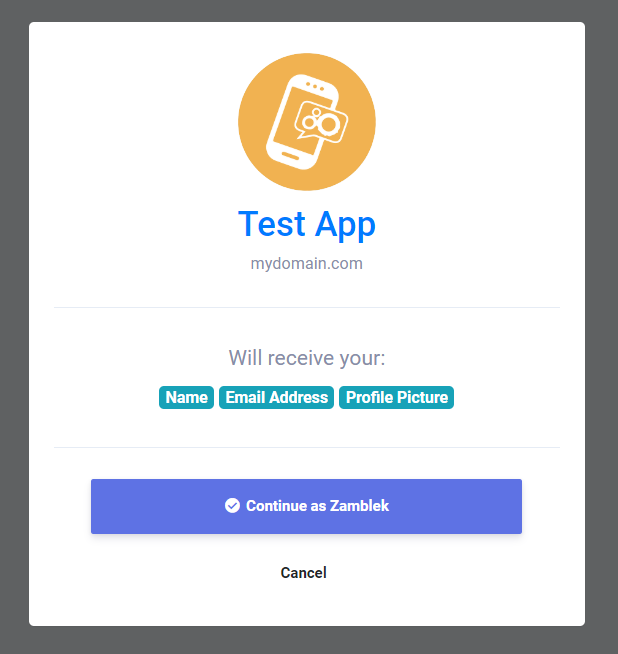
L’utilisateur sera redirigé vers la page Se connecter avec comme ceci
-
Une fois que l’utilisateur a accédé à votre application, il sera redirigé vers l’URL de redirection de votre application avec auth_key Comme ça:
https://mydomain.com/my_redirect_url.php?auth_key=AUTH_KEY
Ceci auth_key Valide uniquement pour une utilisation unique, donc une fois que vous l’avez utilisé, vous ne pourrez plus l’utiliser et générer un nouveau code, vous devrez rediriger l’utilisateur vers le lien de connexion avec.
Jeton d’accès
Une fois que vous avez obtenu l’approbation de l’utilisateur de votre application Connectez-vous avec la fenêtre et renvoyée avec le auth_key ce qui signifie que vous êtes maintenant prêt à récupérer des données à partir de nos API et pour démarrer ce processus, vous devrez autoriser votre application et obtenir le access_token et vous pouvez suivre nos étapes pour apprendre à l’obtenir.
-
Pour obtenir un jeton d’accès, effectuez une requête HTTP GET vers le point de terminaison suivant comme ceci:
        <?php

        $app_id = "YOUR_APP_ID"; // your app id
        $app_secret = "YOUR_APP_SECRET"; // your app secret
        $auth_key = $_GET['auth_key']; // the returned auth key from previous step

        // Prepare the POST data
        $postData = [
          'app_id' => $app_id,
          'app_secret' => $app_secret,
          'auth_key' => $auth_key
        ];

        // Initialize cURL
        $ch = curl_init('https://scriptstribe.com/api/authorize');

        // Set cURL options for POST
        curl_setopt($ch, CURLOPT_RETURNTRANSFER, true);
        curl_setopt($ch, CURLOPT_POST, true);
        curl_setopt($ch, CURLOPT_POSTFIELDS, http_build_query($postData));

        // Execute request
        $response = curl_exec($ch);

        // Check for cURL errors
        if (curl_errno($ch)) {
          die('cURL error: ' . curl_error($ch));
        }

        curl_close($ch);

        // Decode the JSON response
        $json = json_decode($response, true);

        // Use the access token if available
        if (!empty($json['access_token'])) {
          $access_token = $json['access_token']; // your access token
        }
        ?>
Ceci access_token Valide seulement pour une seule 1 heure, donc une fois qu’il est devenu invalide, vous devrez en genarte nouveau en redirigeant l’utilisateur vers le lien de connexion avec à nouveau.
APIs
Une fois que vous avez obtenu votre access_token Maintenant, vous pouvez récupérer des informations de notre système via des requêtes HTTP GET qui prend en charge les paramètres suivants
| Extrémité | Description |
|---|---|
| api/get_user_info |
Obtenir des informations sur l’utilisateur |
Vous pouvez récupérer des informations utilisateur comme ceci
        if(!empty($json['access_token'])) {
            $access_token = $json['access_token']; // your access token
            $get = file_get_contents("https://scriptstribe.com/api/get_user_info?access_token=$access_token");
        }
Le résultat sera:
        {
          "user_info": {
          "user_id": "",
          "user_name": "",
          "user_email": "",
          "user_firstname": "",
          "user_lastname": "",
          "user_gender": "",
          "user_birthdate": "",
          "user_picture": "",
          "user_cover": "",
          "user_registered": "",
          "user_verified": "",
          "user_relationship": "",
          "user_biography": "",
          "user_website": ""
          }
        }

 English
 Arabic
 Czech
Czech
 Spanish
 Portuguese
 Deutsch
 Turkish
 Dutch
Dutch
 Italiano
 Russian
 Romaian
 Portuguese (Brazil)
 Greek
Greek
